
The fleet layer for Terraform.
Placement, capacity, and lifecycle for the infrastructure you stamp — per tenant, per customer, per account — on the runner you already run.
Never runs terraform applyNever holds cloud credentialsRead-only importApache-2.0 backend
Sits on top of Terraform
Sound familiar?
You have this problem if…
- Onboarding a customer means an engineer, a workspace, and a four-hour ticket.
- The per-cluster tenant cap lives in a runbook, and nothing enforces it.
- Deprovisioning gets skipped, and churned customers leak onto the bill.
- Nobody can answer "what does the whole fleet look like right now?"
- Rolling one change across a hundred stacks or accounts takes days.
Terrantula is the layer that answers these — without touching how you run Terraform.
The missing layer
Terraform names your pets. Terrantula herds your cattle.
Terraform is built for infrastructure you curate by hand. Terrantula adds the layer for infrastructure you stamp from a template — where the population matters more than any one instance.
Visibility graph
One view of every tenant, cluster, and stack, derived from the Terraform state you already produce — instead of N workspaces with no system-level picture.
Cascade ordering
Typed relationships with cardinality and lifecycle. Terrantula computes the order changes must happen in — placement, dependency, deprovisioning — so the fleet stays consistent.
Fleet orchestration
Define the template once. Terrantula places each new instance — a tenant, a vended account, a per-team deployment — onto the right cell, enforces capacity, and tracks lifecycle across hundreds of them. One instance is one entity, however many Terraform stacks it spans.
See it
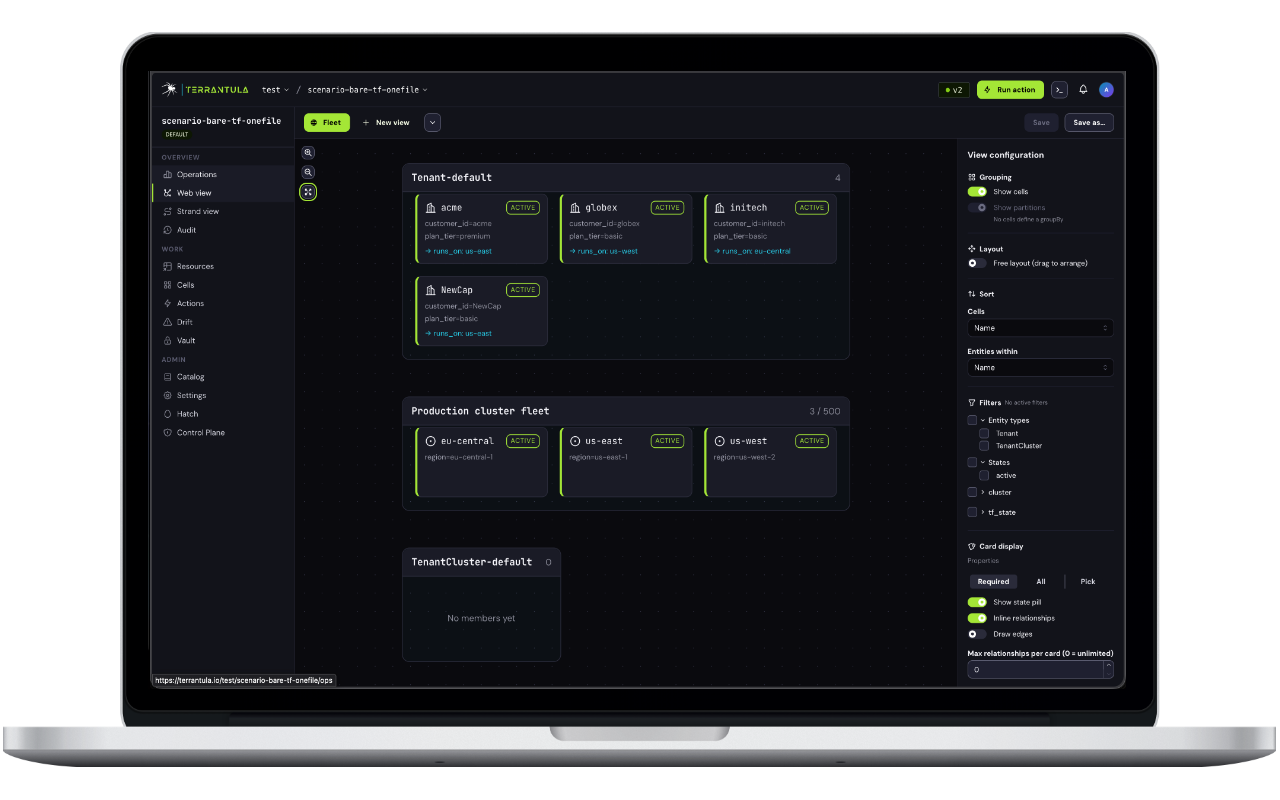
The fleet, as a graph
Entities, cells, and relationships rendered as a living graph. The view is a read-only projection of your Terraform-derived state — changes flow through pull requests, not clicks.
What's in the box
Four primitives, one orchestration model
The model platform teams build by hand at every company with stamped infrastructure — made first-class.
Entities & Cells
Typed, stateful records of what exists — tenants, clusters, databases — placed into cells with capacity constraints and a placement policy.
Relationships & Cascade
Model dependencies with cardinality enforcement. Terrantula derives the cascade order for changes and deprovisioning from the graph.
Actions → PRs
Actions change your IaC by opening a pull request against your repository. Your CI reviews and applies it, exactly as it does today.
Self-hostable
Apache-2.0 backend. The full model — entities, cells, relationships, Actions — runs self-hosted with zero SaaS dependencies.
How it works
From state file to fleet, in five steps
Five minutes gets you a graph of your existing state. Everything after flows through pull requests into the runner you already run.
Import your Terraform state
Point Terrantula at a .tfstate file (or an Atmos stacks directory) and a starter config. It maps your resources to typed entities — no blueprint required.
Learn more: Import your TF state →terrantula import-terraform \ --state ./terraform.tfstate \ --config aws-multi-accountOpen the dashboard
Launch the local fleet view. It runs entirely on your machine — no signup, no server, no Docker.
Learn more: Quick Start (5 minutes) →terrantula dashboard # Dashboard ready at http://localhost:54321Model cells & relationships
Describe the fleet in YAML: entity types, cells with capacity constraints, and typed relationships with cardinality. This is the structure the cascade reasons over.
Learn more: Core Concepts →kind: Cell metadata: name: prod-clusters spec: entityType: TenantCluster placementPolicy: least-loaded constraints: - { metric: tenant-count, aggregate: sum, max: 500 }Run an Action — it opens a PR
An Action like OnboardTenant places the tenant onto the least-loaded matching cell and opens a pull request against your IaC repository.
Learn more: Wire an Action →kind: Action metadata: name: OnboardTenant spec: associatedWith: { entityType: Tenant, scope: collection } recommendations: - { name: target-cluster, pool: prod-clusters, sortBy: tenant-count }Your CI applies the change
The PR lands in your existing workflow. Whatever runs Terraform for you today — TFC, Atmos, Atlantis, or a GitHub Actions workflow with state in S3 — keeps doing it. Terrantula syncs the result back into the graph.
Learn more: Advanced Quick Start →# Reviewer merges the PR → # your existing pipeline runs the apply. # Terrantula syncs the result back into the graph.
Hosted
Terrantula Cloud — early access
A managed control plane: zero-ops hosting, upgrades handled, SSO administered for you, governance and audit surfaces for the fleet. Priced per fleet member — one stamped instance — never per resource. Everything the fleet needs runs free and self-hosted, forever; Cloud is for teams who don't want to operate it.
Self-hostable, end to end.
Apache-2.0 backend. Terrantula + your CI + your state — zero required SaaS dependencies. Start local in under five minutes.